2025
Xbox Nexus
Xbox Nexus – Mobile UI Design for Game Pass Community
Portfolio
Social Collaboration
Know More
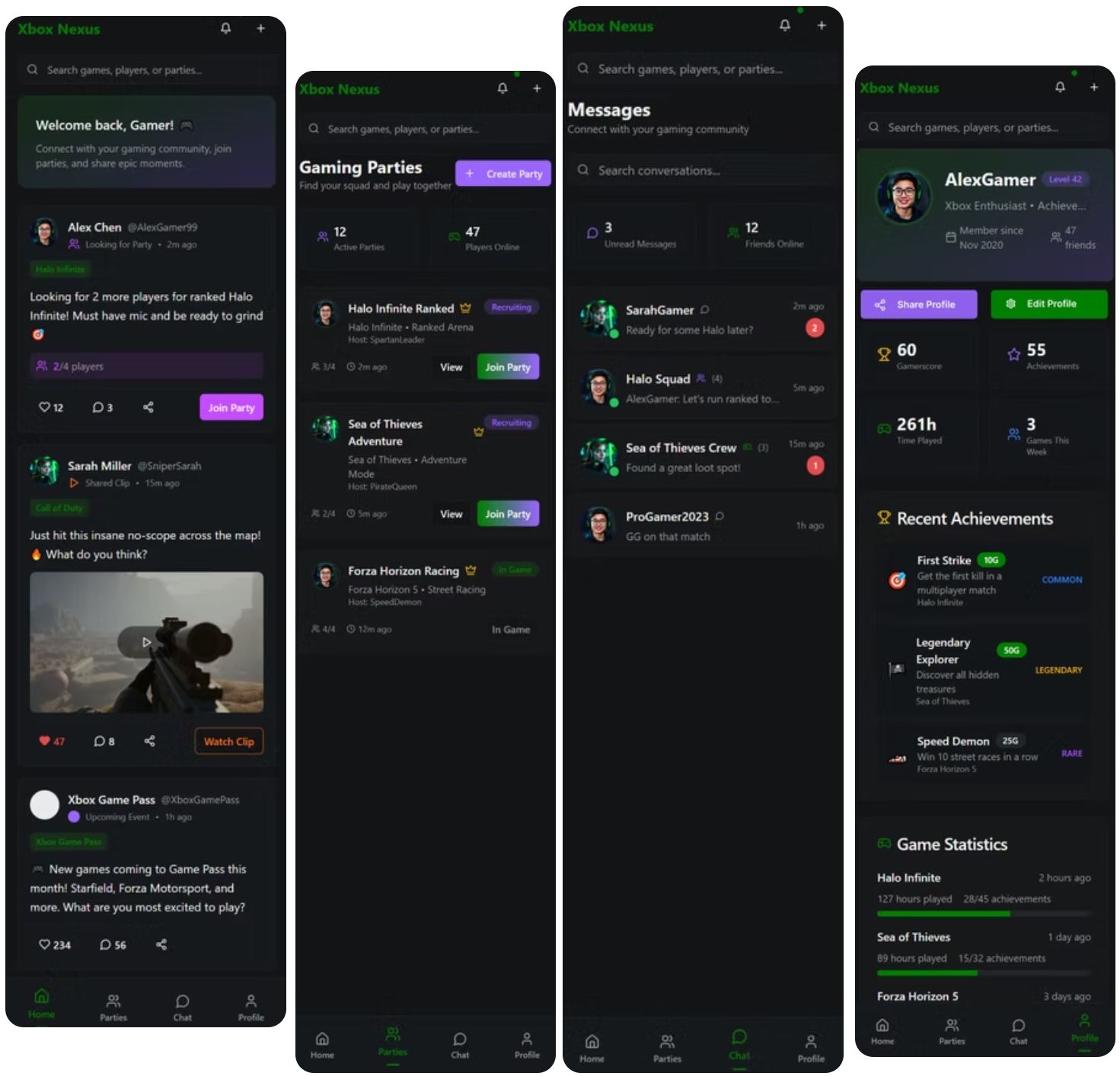
The Xbox Game Pass ecosystem is massive, but its social experience? Fragmented. So I built Xbox Nexus, a mobile-first concept that combines party invites, chat, clips, and stats into one unified experience.
Best Rated Portfolio Around Everywhere
It’s designed to bring players together in a space that feels like Xbox bold, fast, and unapologetically social.
Right now, Xbox nails gameplay but drops the ball on connection. There's no central hub for sharing clips, joining parties, chatting, or checking stats without jumping between apps or platforms. I saw the gap and decided to fill it.
This project shows my ability to design clean, scalable component systems within a rich dark theme. Every detail from the live feed to the join buttons was built with intent. It’s responsive, lightweight, and made for real players.
I didn’t make this for fun. I made it because gaming deserves better design.
The kind that actually serves the community. The kind I’d use myself.
Problem
Despite Xbox’s massive presence in the gaming world, its mobile ecosystem lacks a centralized, social-first experience for players.
There’s no dedicated space for Xbox users to connect outside of the console. Party invites, messages, and game clips are scattered across apps, buried in menus, or worse lost entirely. The current mobile app feels more like a utility than a community.
Players want to do more than launch games. They want to:
See who’s online and looking to play
Share epic moments from their matches
React, comment, and feel part of something
But Xbox offers no cohesive social hub for that. The system for parties is disconnected, the chat is basic and transactional, and clip sharing is an afterthought.
In a world where every other platform from Discord to TikTok prioritizes real-time interaction and media sharing, Xbox still treats mobile like an accessory instead of a destination.
This leaves a real gap:
A place where Xbox players can discover, connect, and engage...just like they play.


Design Approach & Thinking
From the start, this wasn’t just about building a pretty interface it was about capturing the feeling of Xbox on mobile. That meant designing an experience that felt bold, fast, and unapologetically gamer-first.
I started by locking in the visual identity.
A deep dark theme paired with Xbox’s signature green (#107C10) created instant brand recognition. The interface leans into glow effects, gradients, and smooth transitions—bringing that console energy to the small screen.
Design Approach & Thinking
The visual system included:
Glowing card layouts that echo a futuristic console UI
A bottom navigation bar for quick access to Home, Parties, Chat, and Profile
A live feed that surfaces real-time content: party invites, clips, reactions
Subtle animations that provide feedback when you join a party, like a post, or view a clip
But design is more than visuals it's about intent.
So I followed three key principles:
Frictionless Interaction
Every tap should feel effortless. No delays, no confusion.Fast Discovery
Players need to find parties, clips, or friends without digging.Contextual Navigation
The layout adapts to what players want to do in the moment whether it’s watching a clip, chatting, or jumping into a game.
This approach turned a fragmented experience into something unified, usable, and uniquely Xbox.
My Contribution
Concepted and led the end-to-end UX/UI designCreated wireframes, prototypes, and a design systemDesigned custom mobile interactions and component libraryWrote supporting UX copy, animations, and microinteractions
Process & Collaboration
Wireframes sketched, then built in FigmaCreated hand-drawn and digital wireframesUsed ChatGPT to test naming conventions and UI clarityDeveloped motion guidelines for core actionsSimulated community posts with real-world Xbox data and avatars
Systems & Technical Fluency
Designed fully responsive mobile layoutCom
Sponentized feed cards, reaction buttons, player badgesUsed tokens for dark mode and accent controlCreated a scalable system that could expand into desktop or Xbox console UI
Concept
Xbox Nexus isn’t just a concept it’s a blueprint for what Xbox mobile should be.
A unified, community-first experience that finally connects the dots between gaming and social.
🎮 What We Delivered:
A mobile-first experience that feels unmistakably Xbox
A complete design system, ready for scale
Interactive prototypes with real UX patterns and motion
A solution that bridges party invites, clips, chat, and profiles into one seamless flow
🔥 Key Wins:
Solved real user pain points around fragmented communication
Delivered a UI that looks and feels like Xbox, not a generic app
Created a repeatable system that could extend to desktop, tablet, or console
Built a case study that demonstrates deep UX thinking, product strategy, and brand execution
In the end we embraced what was true to the community, remembering ourselves sitting infront of the tv as a child exploring worlds with our friends. With Nexus we just allowed our friends to be anywhere on the big blue marble.

More Works
DIGITAL MACGYVER
©1985


FAQ
01
What exactly does Digital MacGyver do?
02
Who hires you?
03
How do your consulting engagements work?
04
What’s your process like?
05
Do you offer coaching or mentorship?
06
What’s the difference between consulting and coaching with you?
07
How easy is it to edit for beginners?
08
Do I need to know how to code?
2025
Xbox Nexus
Xbox Nexus – Mobile UI Design for Game Pass Community
Portfolio
Social Collaboration
Know More
The Xbox Game Pass ecosystem is massive, but its social experience? Fragmented. So I built Xbox Nexus, a mobile-first concept that combines party invites, chat, clips, and stats into one unified experience.
Best Rated Portfolio Around Everywhere
It’s designed to bring players together in a space that feels like Xbox bold, fast, and unapologetically social.
Right now, Xbox nails gameplay but drops the ball on connection. There's no central hub for sharing clips, joining parties, chatting, or checking stats without jumping between apps or platforms. I saw the gap and decided to fill it.
This project shows my ability to design clean, scalable component systems within a rich dark theme. Every detail from the live feed to the join buttons was built with intent. It’s responsive, lightweight, and made for real players.
I didn’t make this for fun. I made it because gaming deserves better design.
The kind that actually serves the community. The kind I’d use myself.
Problem
Despite Xbox’s massive presence in the gaming world, its mobile ecosystem lacks a centralized, social-first experience for players.
There’s no dedicated space for Xbox users to connect outside of the console. Party invites, messages, and game clips are scattered across apps, buried in menus, or worse lost entirely. The current mobile app feels more like a utility than a community.
Players want to do more than launch games. They want to:
See who’s online and looking to play
Share epic moments from their matches
React, comment, and feel part of something
But Xbox offers no cohesive social hub for that. The system for parties is disconnected, the chat is basic and transactional, and clip sharing is an afterthought.
In a world where every other platform from Discord to TikTok prioritizes real-time interaction and media sharing, Xbox still treats mobile like an accessory instead of a destination.
This leaves a real gap:
A place where Xbox players can discover, connect, and engage...just like they play.
Design Approach & Thinking
From the start, this wasn’t just about building a pretty interface it was about capturing the feeling of Xbox on mobile. That meant designing an experience that felt bold, fast, and unapologetically gamer-first.
I started by locking in the visual identity.
A deep dark theme paired with Xbox’s signature green (#107C10) created instant brand recognition. The interface leans into glow effects, gradients, and smooth transitions—bringing that console energy to the small screen.
Design Approach & Thinking
The visual system included:
Glowing card layouts that echo a futuristic console UI
A bottom navigation bar for quick access to Home, Parties, Chat, and Profile
A live feed that surfaces real-time content: party invites, clips, reactions
Subtle animations that provide feedback when you join a party, like a post, or view a clip
But design is more than visuals it's about intent.
So I followed three key principles:
Frictionless Interaction
Every tap should feel effortless. No delays, no confusion.Fast Discovery
Players need to find parties, clips, or friends without digging.Contextual Navigation
The layout adapts to what players want to do in the moment whether it’s watching a clip, chatting, or jumping into a game.
This approach turned a fragmented experience into something unified, usable, and uniquely Xbox.
My Contribution
Concepted and led the end-to-end UX/UI designCreated wireframes, prototypes, and a design systemDesigned custom mobile interactions and component libraryWrote supporting UX copy, animations, and microinteractions
Process & Collaboration
Wireframes sketched, then built in FigmaCreated hand-drawn and digital wireframesUsed ChatGPT to test naming conventions and UI clarityDeveloped motion guidelines for core actionsSimulated community posts with real-world Xbox data and avatars
Systems & Technical Fluency
Designed fully responsive mobile layoutCom
Sponentized feed cards, reaction buttons, player badgesUsed tokens for dark mode and accent controlCreated a scalable system that could expand into desktop or Xbox console UI
Concept
Xbox Nexus isn’t just a concept it’s a blueprint for what Xbox mobile should be.
A unified, community-first experience that finally connects the dots between gaming and social.
🎮 What We Delivered:
A mobile-first experience that feels unmistakably Xbox
A complete design system, ready for scale
Interactive prototypes with real UX patterns and motion
A solution that bridges party invites, clips, chat, and profiles into one seamless flow
🔥 Key Wins:
Solved real user pain points around fragmented communication
Delivered a UI that looks and feels like Xbox, not a generic app
Created a repeatable system that could extend to desktop, tablet, or console
Built a case study that demonstrates deep UX thinking, product strategy, and brand execution
In the end we embraced what was true to the community, remembering ourselves sitting infront of the tv as a child exploring worlds with our friends. With Nexus we just allowed our friends to be anywhere on the big blue marble.
More Works
DIGITAL MACGYVER
©1985
FAQ
01
What exactly does Digital MacGyver do?
02
Who hires you?
03
How do your consulting engagements work?
04
What’s your process like?
05
Do you offer coaching or mentorship?
06
What’s the difference between consulting and coaching with you?
07
How easy is it to edit for beginners?
08
Do I need to know how to code?
2025
Xbox Nexus
Xbox Nexus – Mobile UI Design for Game Pass Community
Portfolio
Social Collaboration
Know More
The Xbox Game Pass ecosystem is massive, but its social experience? Fragmented. So I built Xbox Nexus, a mobile-first concept that combines party invites, chat, clips, and stats into one unified experience.
Best Rated Portfolio Around Everywhere
It’s designed to bring players together in a space that feels like Xbox bold, fast, and unapologetically social.
Right now, Xbox nails gameplay but drops the ball on connection. There's no central hub for sharing clips, joining parties, chatting, or checking stats without jumping between apps or platforms. I saw the gap and decided to fill it.
This project shows my ability to design clean, scalable component systems within a rich dark theme. Every detail from the live feed to the join buttons was built with intent. It’s responsive, lightweight, and made for real players.
I didn’t make this for fun. I made it because gaming deserves better design.
The kind that actually serves the community. The kind I’d use myself.
Problem
Despite Xbox’s massive presence in the gaming world, its mobile ecosystem lacks a centralized, social-first experience for players.
There’s no dedicated space for Xbox users to connect outside of the console. Party invites, messages, and game clips are scattered across apps, buried in menus, or worse lost entirely. The current mobile app feels more like a utility than a community.
Players want to do more than launch games. They want to:
See who’s online and looking to play
Share epic moments from their matches
React, comment, and feel part of something
But Xbox offers no cohesive social hub for that. The system for parties is disconnected, the chat is basic and transactional, and clip sharing is an afterthought.
In a world where every other platform from Discord to TikTok prioritizes real-time interaction and media sharing, Xbox still treats mobile like an accessory instead of a destination.
This leaves a real gap:
A place where Xbox players can discover, connect, and engage...just like they play.
Design Approach & Thinking
From the start, this wasn’t just about building a pretty interface it was about capturing the feeling of Xbox on mobile. That meant designing an experience that felt bold, fast, and unapologetically gamer-first.
I started by locking in the visual identity.
A deep dark theme paired with Xbox’s signature green (#107C10) created instant brand recognition. The interface leans into glow effects, gradients, and smooth transitions—bringing that console energy to the small screen.
Design Approach & Thinking
The visual system included:
Glowing card layouts that echo a futuristic console UI
A bottom navigation bar for quick access to Home, Parties, Chat, and Profile
A live feed that surfaces real-time content: party invites, clips, reactions
Subtle animations that provide feedback when you join a party, like a post, or view a clip
But design is more than visuals it's about intent.
So I followed three key principles:
Frictionless Interaction
Every tap should feel effortless. No delays, no confusion.Fast Discovery
Players need to find parties, clips, or friends without digging.Contextual Navigation
The layout adapts to what players want to do in the moment whether it’s watching a clip, chatting, or jumping into a game.
This approach turned a fragmented experience into something unified, usable, and uniquely Xbox.
My Contribution
Concepted and led the end-to-end UX/UI designCreated wireframes, prototypes, and a design systemDesigned custom mobile interactions and component libraryWrote supporting UX copy, animations, and microinteractions
Process & Collaboration
Wireframes sketched, then built in FigmaCreated hand-drawn and digital wireframesUsed ChatGPT to test naming conventions and UI clarityDeveloped motion guidelines for core actionsSimulated community posts with real-world Xbox data and avatars
Systems & Technical Fluency
Designed fully responsive mobile layoutCom
Sponentized feed cards, reaction buttons, player badgesUsed tokens for dark mode and accent controlCreated a scalable system that could expand into desktop or Xbox console UI
Concept
Xbox Nexus isn’t just a concept it’s a blueprint for what Xbox mobile should be.
A unified, community-first experience that finally connects the dots between gaming and social.
🎮 What We Delivered:
A mobile-first experience that feels unmistakably Xbox
A complete design system, ready for scale
Interactive prototypes with real UX patterns and motion
A solution that bridges party invites, clips, chat, and profiles into one seamless flow
🔥 Key Wins:
Solved real user pain points around fragmented communication
Delivered a UI that looks and feels like Xbox, not a generic app
Created a repeatable system that could extend to desktop, tablet, or console
Built a case study that demonstrates deep UX thinking, product strategy, and brand execution
In the end we embraced what was true to the community, remembering ourselves sitting infront of the tv as a child exploring worlds with our friends. With Nexus we just allowed our friends to be anywhere on the big blue marble.
More Works
©1985
FAQ
What exactly does Digital MacGyver do?
Who hires you?
How do your consulting engagements work?
What’s your process like?
Do you offer coaching or mentorship?
What’s the difference between consulting and coaching with you?
How easy is it to edit for beginners?
Do I need to know how to code?